Insurance
Fire safety services firm automates certificate generation end-to-end
A fire safety services firm certified inspections by typing client data into official certificate PDFs — slow, error-prone, and repeated for every inspection. We built two automations: one mines years of legacy forms into a single validated master list; the other watches each team's input folder around the clock, validates every row, fills the official certificate template, updates the master list, and emails the result — a certificate every 15 minutes without anyone touching the keyboard.
What we used: RPA Development, Process Automation, Intelligent Document Processing
1The problem
- Staff keyed client and inspection data into official PDF certificate templates by hand — every serial number, address, telephone, and authorized person typed from scratch.
- The source data lived in years of legacy PDF forms in two client groups, so records were scattered and impossible to validate against.
- Serial-number prefixes, authorized-person mappings, and next-due dates depended on tribal knowledge rather than rules.
- One bad cell meant a misprinted official certificate — the cost of a typo was a client-facing document.
2What we did
- 1A master-list extractor reads the legacy PDF forms, pulls the embedded form data out as structured records, and maps coded values — regions, building types, unit types — back into readable English or Chinese.
- 2The consolidated master list became the single source of truth for both client groups, with creation and modification dates preserved from the original forms.
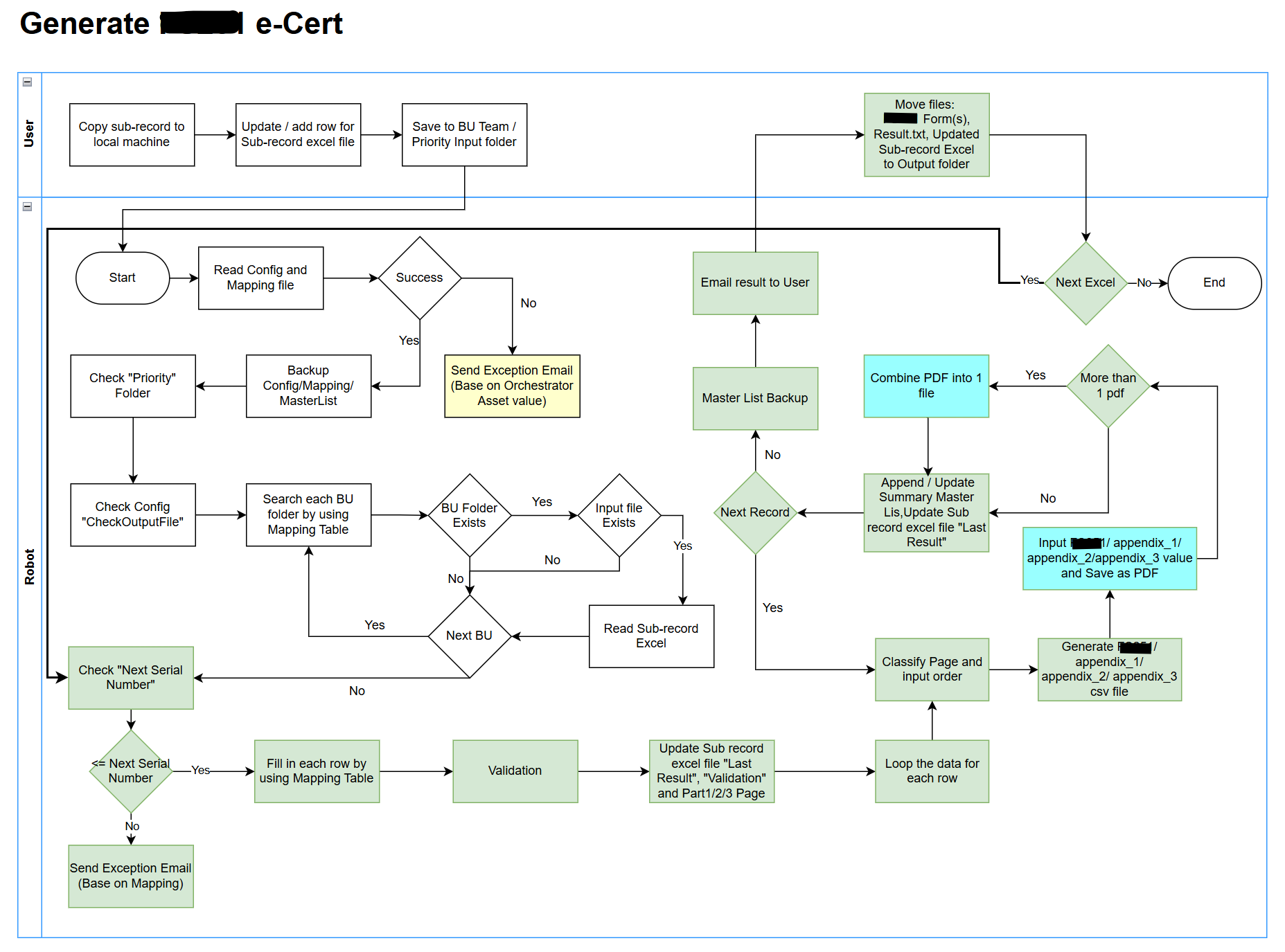
- 3A certificate robot runs every 15 minutes, scanning each team's input folder for new sub-record workbooks.
- 4Before anything else, it backs up the master list — and backs it up again after the run — so every change is recoverable.
- 5Every row is validated first: required fields, serial-number prefixes and suffixes, telephone and authorized-person enrichment, and next-due dates filled from rules — invalid rows are logged with the reason instead of stalling the batch.
- 6Valid rows are typed into the official certificate PDF template, with authorized-person lookups switching by certificate class and duplicate serial numbers handled deterministically.
- 7Completed certificates are filed, the master list and run log updated, and a notification email closes every cycle — failures included, so nothing dies silently.
3Inside the Platform
Get results like this
We’ll assess your process and give you a straight answer on what automation could return.