Retail & Consumer
DHL invoices land in NetSuite as freight bills — end to end, unattended
A global consumer brand's freight invoices lived behind a carrier portal: finance logged into DHL by hand, searched invoices in a date range, downloaded CSVs and justification files — then re-entered the same data into NetSuite as freight cost bills. We automated the whole chain. An unattended robot works the DHL portal every 15 minutes, a scheduled NetSuite import turns the CSV into bills, and every run verifies itself and reports by email.
What we used: RPA Development, Process Automation
1The problem
- Staff logged into the DHL carrier portal by hand, searched invoices within a target date range, and downloaded the invoice CSV plus justification archives — every cycle, every time.
- The same numbers were then re-entered into NetSuite to create freight cost bills — identical data handled twice, in two systems.
- Nothing tied the portal and the ERP together: no shared log, no clean handoff, no single place to see what had already been processed.
- Failures — a refused login, an empty search, a missing document — surfaced late and informally, whenever someone noticed.
- And the estate is macOS on Apple Silicon — not the Windows environment most RPA tooling is built for, so everything from robot installation to browser automation had to work outside the usual comfort zone.
2What we did
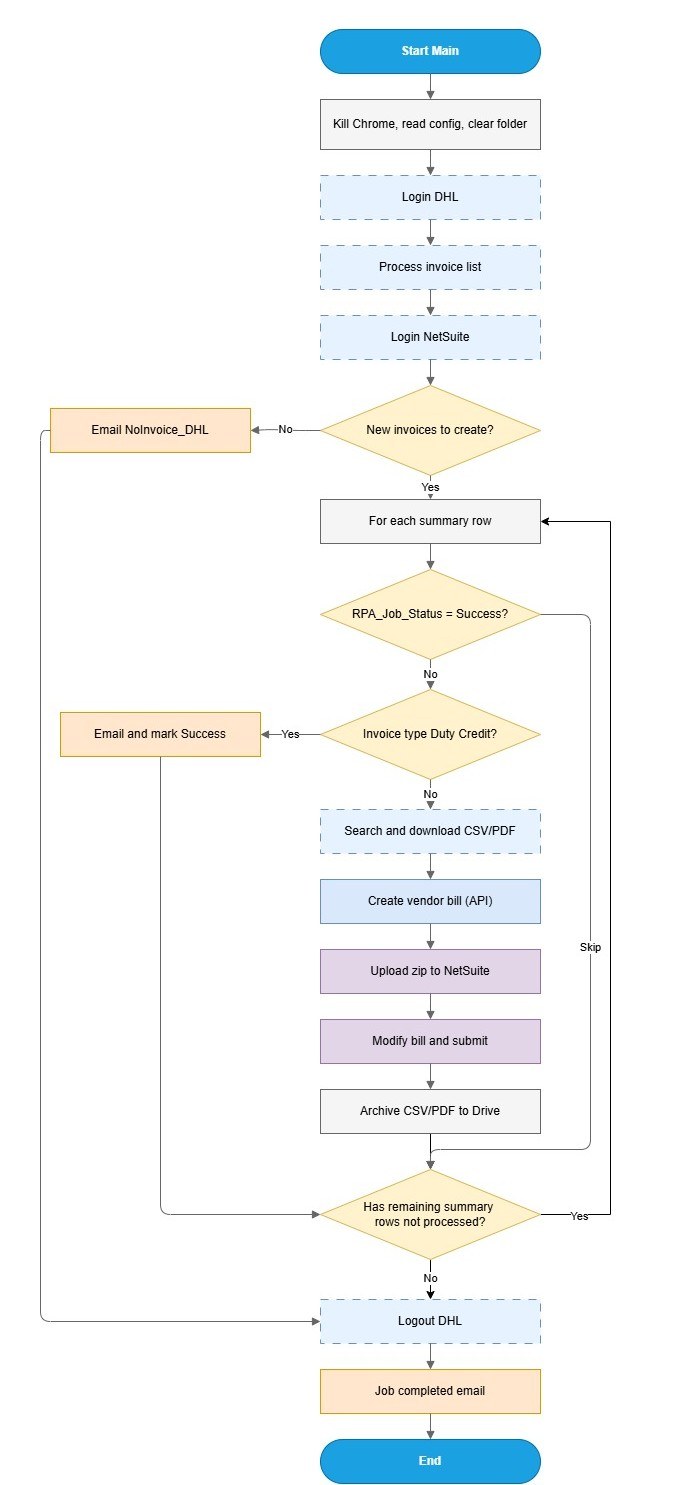
- 1An unattended robot starts every 15 minutes and reads the target date range from a text file in the shared input folder — the team controls scope simply by dropping a file in.
- 2It logs into the DHL portal, searches invoices within the range, and downloads the invoice-detail CSV and the justification archive.
- 3Processed inputs move to a Complete folder and outputs land in a defined Output folder — the handoff is unambiguous, and nothing gets processed twice.
- 4On the NetSuite side, a scheduled SuiteScript job imports the CSV as freight cost bills — the ERP is updated through its own import mechanism, not through screen scraping.
- 5The robot then verifies the import results, catching errors and partial failures instead of assuming success.
- 6Exception paths cover DHL login failures, empty result ranges, download failures, missing documents inside the archive, and NetSuite import failures.
- 7Every run closes with an emailed summary log; failures escalate by email — nothing dies silently.
- 8The whole flow was built for the client's macOS estate — the robot runs on Apple Silicon Macs, automating the portal and folder handoffs natively instead of forcing a Windows box into a Mac-only environment.
3Inside the Platform
Get results like this
We’ll assess your process and give you a straight answer on what automation could return.